|
Confused?
Is it any wonder that most PC users are confused by all the jargon and technology. Yes, computers are complicated, but they are logical and only do what they are told. Most of us now realise that the much misused term “Computer Error” really means that some human made a mistake and blamed a computer instead. Hopefully, on this page I’ll clear up some other misconceptions.
Computer Security 
One particular area that is shrouded with mystery is Computer Security. Mainstream journalists concentrate on their sensational “Virus attack” headlines, security firms play on user’s fears and software developers are slow to admit problems. The usual advice is to, “buy a security suite, install a firewall and secure your wireless network”. However, is this all really necessary and are we all missing the point?
Consider the security of your home for a minute. At night before we go to sleep, most of us lock our front door, close the windows and turn on the alarm. Frequently, however, burglars will enter a house through an open window or unlocked door. The alarm may sound but the burglar will already be in your house. There are parallels with computer security here. Antivirus and Anti-spyware software work just like an alarm. They won’t stop malware getting onto your PC, instead they just detect the malware once it’s there, sometimes! So, how did that virus get on my PC in the first place? Well, by any of these methods: a compromised website; a downloaded program or file; an email attachment; a USB flash drive; an open port or a software bug. The latter is easy to deal with, like locking your front door - just enable Automatic updates in Windows. This will keep your operating system up to date and prevent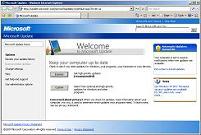 bugs being exploited by hackers and script kiddies. A firewall can prevent unauthorised access to your PC through open ports but these mostly have one fatal weakness, the user. Present a typical user with too many questions, like many firewalls do, and most users will stop reading the prompts offered and just click [OK]. Unless you really understand all the prompts then just stick with the Windows firewall. bugs being exploited by hackers and script kiddies. A firewall can prevent unauthorised access to your PC through open ports but these mostly have one fatal weakness, the user. Present a typical user with too many questions, like many firewalls do, and most users will stop reading the prompts offered and just click [OK]. Unless you really understand all the prompts then just stick with the Windows firewall.
The important point
The single most important point crucial to PC security is usually overlooked and that is how you actually use your PC. If you frequently share files and load programs sent to you by others without question, then you are asking for trouble. Use your PC sensibly by installing software only from trusted sources, be careful on unfamiliar websites especially those that require an additional software installation, avoid the temptation to click [OK] each time a new window pops-up on screen - take time to actually read the message, don’t click on website links within emails (see phishing) and don’t respond to or even open emails that you know are Spam - just delete them. If a family share a PC, is everyone using the PC in the same way, to the same rules?
PC Security software
If you keep Windows up to date, enable a firewall and use your PC sensibly, then why would you have any need for antivirus software? Surely, few viruses will be able to infect your PC in the first place.  Well, I guess the answer is, “just in case”. However, before you rush out and buy the newest version of the same old £40 security suite you’ve always bought, stop for a minute! Some of the best security products are free and in most cases function better than the big-name suites. Better still, just use the built-in antivirus software on your computer, like Windows Security. Some well known security suites even behave worse than the malware they are supposed to protect us from, not updating properly to newer versions and being very difficult to uninstall should you decide to change your mind and install a different package. Be wary that most commercial packages are also subscriptions (McAfee) and even if you stop using their product you may still be billed on your credit card. Well, I guess the answer is, “just in case”. However, before you rush out and buy the newest version of the same old £40 security suite you’ve always bought, stop for a minute! Some of the best security products are free and in most cases function better than the big-name suites. Better still, just use the built-in antivirus software on your computer, like Windows Security. Some well known security suites even behave worse than the malware they are supposed to protect us from, not updating properly to newer versions and being very difficult to uninstall should you decide to change your mind and install a different package. Be wary that most commercial packages are also subscriptions (McAfee) and even if you stop using their product you may still be billed on your credit card.
Overall, most PC security products are very overrated and totally ineffective against ‘social engineering’ scams. I mean, how on earth does antivirus software protect you when a scammer rings you up on a phone or sells you unnecessary software in a shop? Truth is, they don’t.
Footnotes: In Apr 2011, PC Pro magazine tested Security Suites and found that three gave 100% protection. This is total nonsense. Their testing method was completely unrealistic and the winners were big advertisers in the magazine!
In 2013, PC Pro got caught up in the industry-wide smearing of Microsoft Security Essentials. Shame on them!
Internet safety
This really should be a whole section in itself, but you will find the Childnet website already contains some good advice on this topic. If you have children, take an interest in what they are doing on a PC, be open and communicative and become involved in what your kids do online. Explain to them the risks and how you expect them to use the computer. The latter is especially important for older children. Don’t put your trust in Parental Control Software, because it can be by-passed easily. Remember, educate not regulate.
My advice then is to ….
• Use your PC sensibly and responsibly. Don’t for a second believe that your PC security software will protect you no matter what you do.
• Avoid running or installing software from un-trusted sources and be suspicious of programs reporting that your PC has a virus.
• Enable Automatic Updates to ensure that your PC installs all the latest Microsoft security fixes.
• Ensure that other application software is also kept up to date, for example, your Internet Browser.
plus ....
• Are you logged on as an administrator? If you’re not sure, then the answer is probably yes. That means you, and any program that you run, have full access to your PC and files. So will any programs that you didn’t intend to run, like viruses.
• If you have a network, wherever possible use a network cable to connect devices, instead of wireless connections. A cabled network will be faster, more secure, more reliable and won’t be affected by cordless telephones, neighbouring wireless networks, Sky video senders, digital baby monitors, wireless headphones or microwave ovens!
|



